
Work today's follow-up list处理今天的跟进名单
One list, grouped by family, in the five moments work actually happens — so a parent with three reasons to be called is one conversation, not three rows.一张清单,按家庭分组,依照实际做事的五个时机排列——一位家长有三件事要谈,就是一通电话,而不是三行。
这篇指南的正文目前只有英文版。标题、摘要与导览已翻译;内文仍在翻译中。
Every night the system looks at every student and works out who needs attention tomorrow. That is your worklist. Working it is the single highest-value hour at the front desk, because most of it is money that would otherwise walk out.
1. Open the Daily List
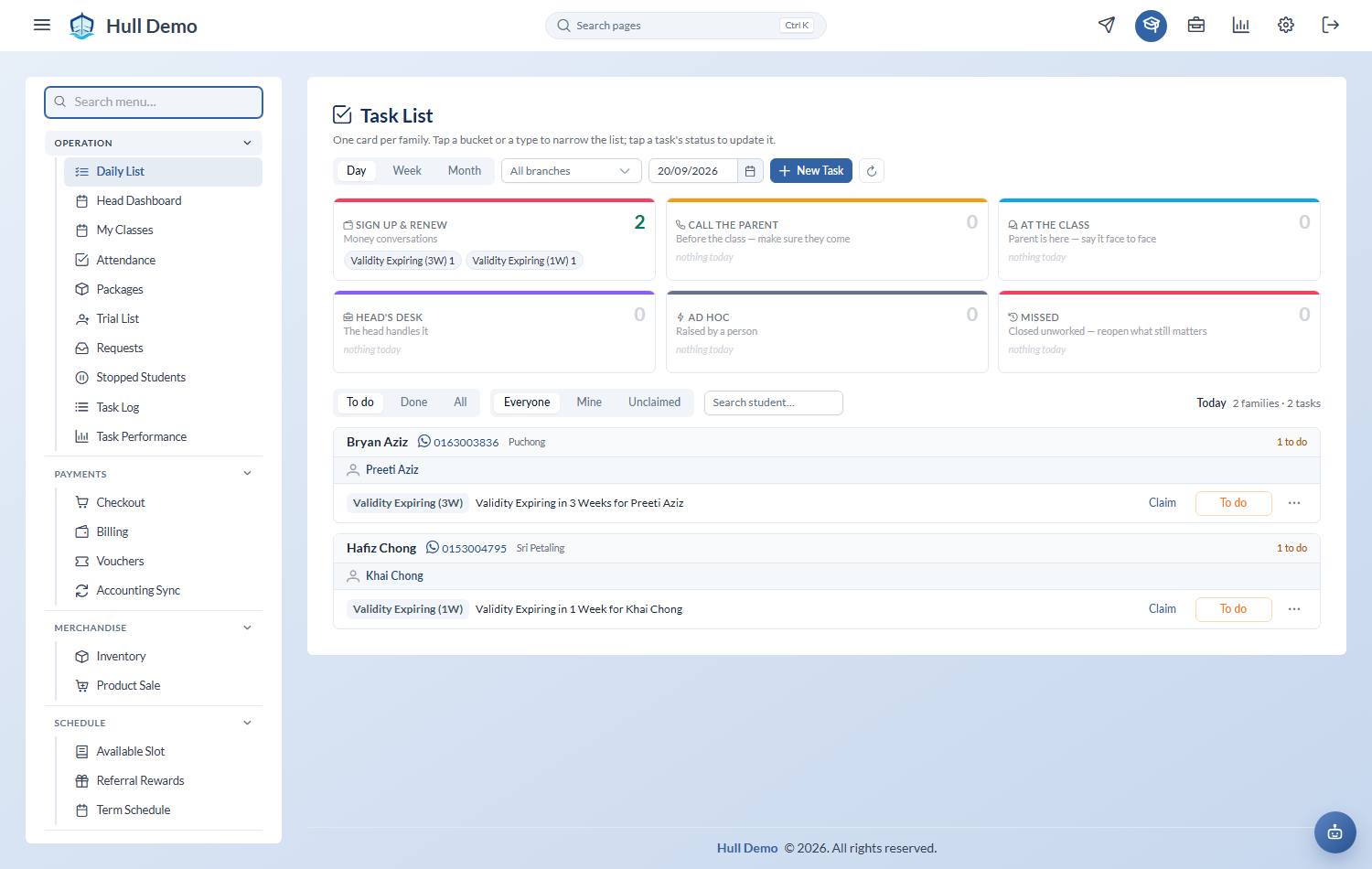
Operation → Daily List. One list, not eighteen: everything the system worked out overnight, grouped by family.
2. Read it by when you do the work
Across the top sits one card per bucket — the moment in the day when that kind of work actually happens — each with its count and the task types inside it. Tap a card to see only that bucket; tap a type chip inside it to narrow further.
| Bucket | When |
|---|---|
| Sign up & renew | Money conversations |
| Call the parent | Before the class — make sure they come |
| At the class | The parent is here — say it face to face |
| While teaching | The coach, in the water |
| Head's desk | The head handles it |
| Ad hoc | Raised by a person |
Beside them sits Missed, in red: what the system closed because the day ran out and nobody got to it. It is not a punishment and it is not gone — see *What the day closes for you* below.
3. Work it one family at a time, in the order the day happens
Below the cards, one card per family: the parent's name, phone, branch and how many things are to do, then a block per child with that child's class time, coach and their own tasks under it.
A parent with three reasons to be called is one card with three lines, not three rows in three different tables — which is how the call actually happens.
The list is in class-time order, read top to bottom as the day happens: the 3pm family above the 8pm one. A family sits at its earliest child's class, and a child at their own. Anything already closed sinks to the bottom of that child's list, so a struck-through row never sits above work still to do.
Tasks with no class — renewals, chases, ad hoc, the head's desk — get their own No class today section underneath rather than interleaving with the timetable. The heading only appears when there is something in both.
Four controls stay on screen: Day / Week / Month, the branch, the date with a Today button, and Everyone / Mine / Unclaimed. The status filter is three ways — To do, Done, All.
4. Say what happened
You do not pick a status. Every task offers the same four words — Won · Later · Lost · No answer — and only the line underneath each changes to describe what it means for that job. A renewal's "Won" is *they renewed*; a trial follow-up's is *they signed up*; a certificate's is *handed over*.
That shared vocabulary is the point: it is what lets a head compare a consultant's week with the front desk's. An earlier version worded the buttons themselves per task, which read better on one screen and made the week uncountable.
Five things sit underneath, and only four of them are yours:
| Underneath | What it means |
|---|---|
| Won | What you wanted, happened |
| Later | Still alive. Needs a date |
| Lost | It is over. Needs a reason |
| No answer | Could not reach them. Tries again tomorrow |
| Missed | Nobody got to it. The system sets this, never you |
Closing a task produces something you can count, or it is refused. "Come back to it" without a date is just *forever later*; "not happening" without a reason is a number nobody can act on. Both are turned down with a sentence, not a warning you can click past.
Lost means three different things, and the screen says which
This is worth two minutes, because pressing the same word on two tasks does two very different things to the family.
| Pressing Lost on… | What it does | Which reasons you are asked for |
|---|---|---|
| a trial | Records the decline. The child does not become a stopped student | Your trial decline list, plus the five drivers |
| a renewal conversation | Stops the student, that day — exactly as the Stop button on their profile does: status, stop date, bookings ended | Your stop list. Required, plus the optional exit ratings |
| anything else — a certificate to hand over, a replacement to arrange, a first lesson to brief | Closes the task and touches nothing else | A short why it did not happen list |
The dialog tells you which of the three you are in before you commit to it.
Come back to it, and the call-back date
"Call me next week" used to have nowhere to go: the task either nagged every morning or was closed and forgotten.
Now it parks. Pick the day, and the task keeps the day it was raised — so the record of when the work first appeared stays honest — drops off the list until then, and comes back that morning. A parked task is not counted as undone work in the meantime, because it is not.
Choosing *Come back to it* closes the task and raises its successor on the day you chose, carrying a link back to where it came from. A family put off three times therefore reads as one conversation with three deferrals, not three unrelated blank rows.
What the day closes for you
At the end of its day, anything nobody got to is closed as Missed. It is not lost: the red Missed card shows the last week of them, and a head can press Put back to return one to today's list.
Only a missed task can be put back. Anything else was closed by a person on purpose, and reopening it would quietly rewrite what happened. Put back is the head's decision — everyone can see the card, heads can act on it.
5. Who owns it
The Owner column is one word. Claim when nobody has it, or the person's name when somebody does — press it to Release your own, or Take over someone else's. A head or the owner can Assign work to a named person from the details dialog.
Whoever ticks an unclaimed task first becomes its owner, so the list records who actually did the work without anybody having to remember to claim it first.
What generates a task
Each prompt is a rule your academy can switch on or off, so your list may be shorter than another branch's. These are on by default:
| Prompt | Bucket | Fires when |
|---|---|---|
| Serve Trial | At the class | A free trial is happening today — receive the family at the pool |
| Trial Reminder | Sign up & renew | A free trial is tomorrow — send the reminder message |
| Last 2 Classes / Last Class | Sign up & renew | The package is nearly spent — the renewal window |
| Expired | Sign up & renew | The package has run out |
| Validity Expiring | Sign up & renew | The clock runs out in three weeks, then in one |
| First Lesson | At the class | A new student's first class |
| Cert | At the class | A certificate is due to be handed over — once per assessment |
| Replacement | Call the parent | A make-up class needs arranging |
These are off until you ask for them, because each one is new daily work for a real person and the list is only useful if it is short enough to finish:
| Prompt | Bucket | Fires when |
|---|---|---|
| Last 41 / 21 / 11 Classes | Sign up & renew | The long rungs of the renewal ladder — for big packages, where five left is far too late to start talking |
| Classes Finished | Sign up & renew | The classes have run out — chased once a week for two weeks, then it stops |
| Two Thirds Done | Sign up & renew | Two thirds of the current package is used: talk about progress while there is still time to renew |
| Missed 2 Classes | Call the parent | A child has been absent twice in a row |
| Trial No-Show | Call the parent | A trial was booked and nobody came |
| Never Booked | Call the parent | They enquired and never booked a trial at all |
| Trialled, Not Signed | Call the parent | Attended a trial one to seven days ago and still no package |
| Missed Last Class | Call the parent | Nothing left, and the final class was missed |
| Freeze Ending | Call the parent | A frozen package is about to resume |
| Next Term Due | Sign up & renew | A term package is ending and the next has not been sold |
| No Progress (90 Days) | At the class | Ninety days without a level change |
| Coach Change | At the class | A replacement coach was assigned |
| Google Review | At the class | Their first certificate — the moment to ask |
| Feedback Form | At the class | Exactly two levels cleared |
The trial is two jobs now
Sending tomorrow's reminder and receiving the family at the pool on the day are different work, done by different people, at different times — so they are two tasks with two outcomes. Closing the reminder does not close the serve.
It was one task doing both, which made a sent reminder and a served family indistinguishable — and the half that quietly got forgotten was always the reminder.
On screen the old Trial task now reads Serve Trial. Nothing moved in your history — it is the same task with a name that says what it is for.
The renewal ladder, for a big package
The renewal prompts step down as the package empties: 41 → 21 → 11 → 5 → 3 → 2 → 1 classes left. The bottom four are on by default; the top three are off until you ask.
They exist because the short rungs are the entire renewal conversation for a four- or nine-class package and useless for a thirty- or sixty-class one. By the time five are left, that family has been coming for half a year and the talk is starting far too late. Switching on 41 gives you a prompt with a term still to run.
Three more have no trigger and are raised by hand: Assessment Due and Filming, plus Ad Hoc — the owner posting a job for a role or a branch, which whoever ticks it first owns.
Two rules changed on 14 September. *Two Thirds Done* is gone: two thirds of a four-class package is one class left, and of a nine-class package three left — days the last-class prompts already own. And Completion Risk is back, after four days folded into the validity prompts, which turned out not to be the same thing: neither validity flag was switched on anywhere, so for those four days nobody was told they were about to lose classes. It now arrives at most fifteen a run, most urgent first, so a backlog drains over a week instead of landing on one morning.
There is also an exit feedback prompt: when a family leaves, ask them why.
Operation → Task Log is still there for the full history — every task, with its type, student, owner, status and notes, filterable however you like. The Daily List is the day's work; the Task Log is the record.
If your academy has its own information page — the one you scroll through with a parent at a trial — an Academy Info button sits beside the list, so it is one tap away while the family is standing at the counter. Ask us to link it during setup if you would like that.
Related: See who is in class today · Turn a trial into a sign-up · Sell a package.