
Work the Requests queue处理审批队列
Every request waiting on a decision in one place — freezes, extensions, carry-forwards and class changes — and what you are actually agreeing to in each case.所有等待决定的申请集中一处——冻结、延期、余额转移与课堂变更——以及每一种你实际在同意什么。
这篇指南的正文目前只有英文版。标题、摘要与导览已翻译;内文仍在翻译中。
Requests are how the academy says yes to a family without giving away revenue by accident, and how a change to a class gets a second pair of eyes. Each one waits for a decision, and each has a different cost.
One queue, four kinds
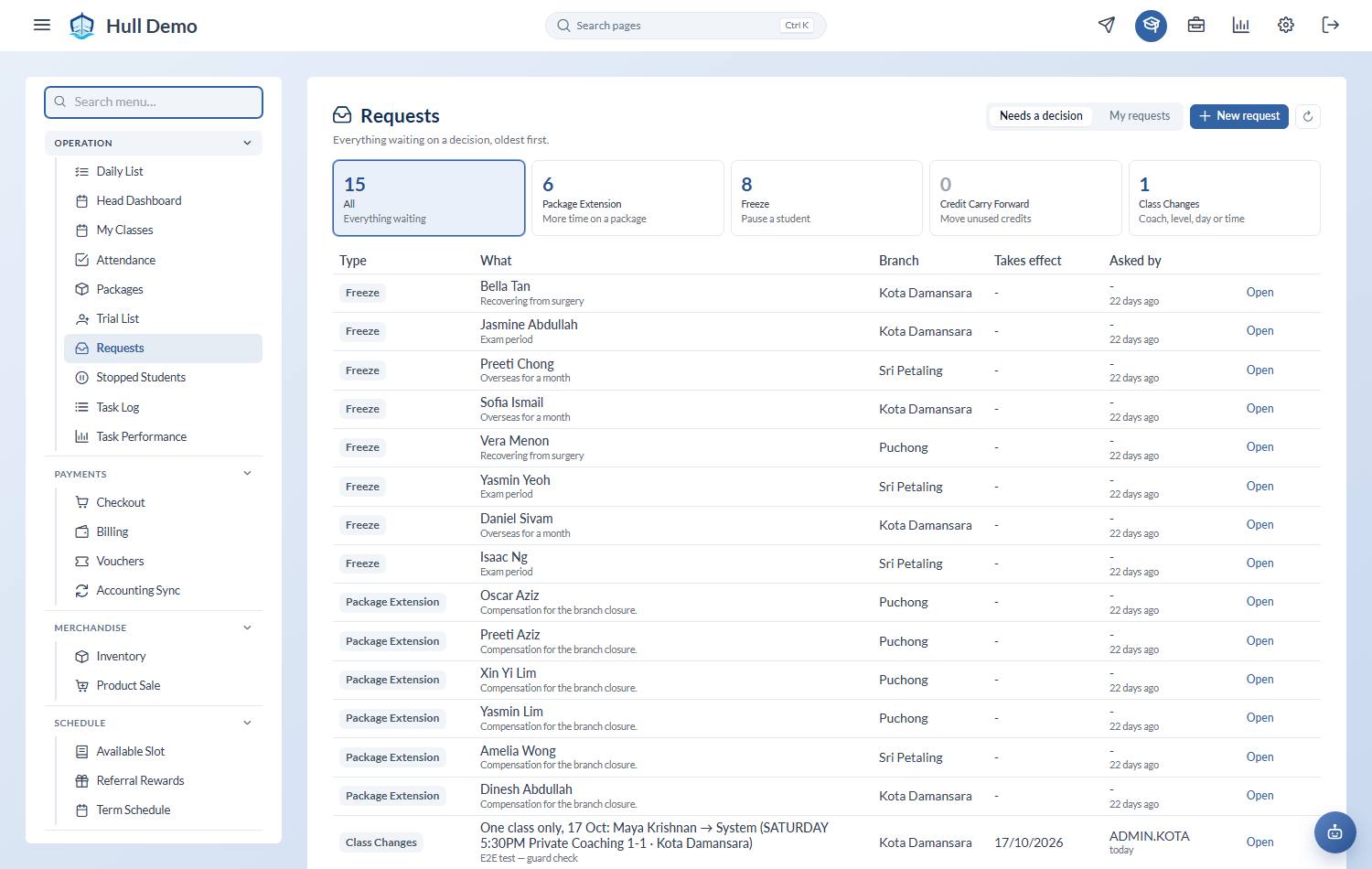
Operation → Requests. One page, a card per kind with its waiting count:
| Card | What it is |
|---|---|
| Package Extension | More time on a package |
| Freeze | Pause a student |
| Credit Carry Forward | Move unused credits |
| Class Change | Coach, level, day or time |
They used to be four separate screens, three of them buried under Schedule, so staff opened four to find three empty — and whoever raised a request had no way to see where it got to. Tap a card to work that kind, or All for everything waiting, oldest first.
Two lenses sit above it:
- Needs a decision — what is waiting on you.
- My requests — what *you* asked for, and where it got to.
New request raises one without leaving the page, offering only the kinds you can actually see.
What you are agreeing to
A freeze stops the clock and pushes the expiry out by the same number of days. Check the dates are the dates the family is actually away, and note that approval extends *every* package the child holds, not only the one named — if they are away, all their clocks should stop.
An extension gives more time without a pause. The honest reason is usually compensation: a closure, a coach absence, something the academy caused. Look at Days to Extend and the resulting expiry, and ask whether the reason is one you would want repeated for the next fifty families.
A carry-forward moves credits the family already paid for out of an expiring package into a new one. You are not giving anything away that they did not buy — but you are extending the life of money that was about to expire, so it is a commercial decision, not an administrative one.
A class change is a change to the class itself — a different coach, level, day or time, a new class, one being closed or reopened. See Approving a change to a class below.
Deciding
Open the request, read the remarks and any attachment, then Approve or Reject. Both are recorded against your name with the time.
Keeping the backlog short
Requests sitting unapproved are worse than either answer. The family is waiting, the front desk cannot commit, and the package continues to burn down in the meantime. Clear them on a schedule — a few minutes a day beats a monthly purge.
Approving a change to a class
Where your academy switches it on, changing a class stops being something one person does and becomes something somebody asks for. Seven areas can be put behind an approval independently — the coach on a single session, the coach on the whole class, creating a class, opening or closing one, ending one, the class type, and the day or time. Each has its own switch, and all of them start off, so nothing changes for your academy until you ask.
With one on, the button reads Request rather than Change, and the request lands in the queue with what changes, when it takes effect and why.
Every change carries the date it takes effect, and nothing already taught is ever rewritten. Approving late still applies — payroll pays whoever is named on the session that ran, so a class that happened last week keeps the coach who actually taught it.
The register is held while it waits
While a change to a class is waiting, that class's attendance is held. The register says Attendance on hold with the change underneath it, and marking is refused with the same explanation.
Marking Present spends a credit, and a credit spent against a session the approval is about to move makes the change impossible to apply. Deciding the request — either way — frees the register at once, which is the real reason to keep the queue short.
Only changes to the class as a whole hold it: the coach, the class type, the day or time, or closing the class. Swapping the coach for one session does not.
Every change is recorded, whatever you decide
A record is kept for every class change — approved, rejected, withdrawn, and the ones still waiting — with what was asked for, by whom, when, when it would take effect, and the reason. A rejected request is not a non-event: "we asked to move Thursday's class and were told no" is exactly the thing somebody wants to look up three months later.
Changing a coach is a manager's job
Separately from all of that, moving a coach onto a class or a session is now limited to the owner, a head or a branch admin — and only in their own branch. Payroll credits whoever is named on the session, so reassigning one quietly moves somebody's pay. It is not hypothetical: a coach account put another coach on two of its own classes within a couple of minutes, and the only trace left was a timestamp.
Related: Freeze a package · Extend a package · Carry credits into another package.