
Schedule an assessment安排一次评估
Put a child forward for their level test, on the day their class runs.在孩子上课那天,替他报名等级测验。
这篇指南的正文目前只有英文版。标题、摘要与导览已翻译;内文仍在翻译中。
An assessment is the formal check that a child has finished a level. You schedule it against the class they normally attend, so it happens where they already are.
1. Open Assessment Dates
Student Progress → Assessment Dates. Pick the Date, and filter by Branch, Class Type, Coach or Time to get to your class.
Classes are grouped by time, each showing its coach and the students in it.
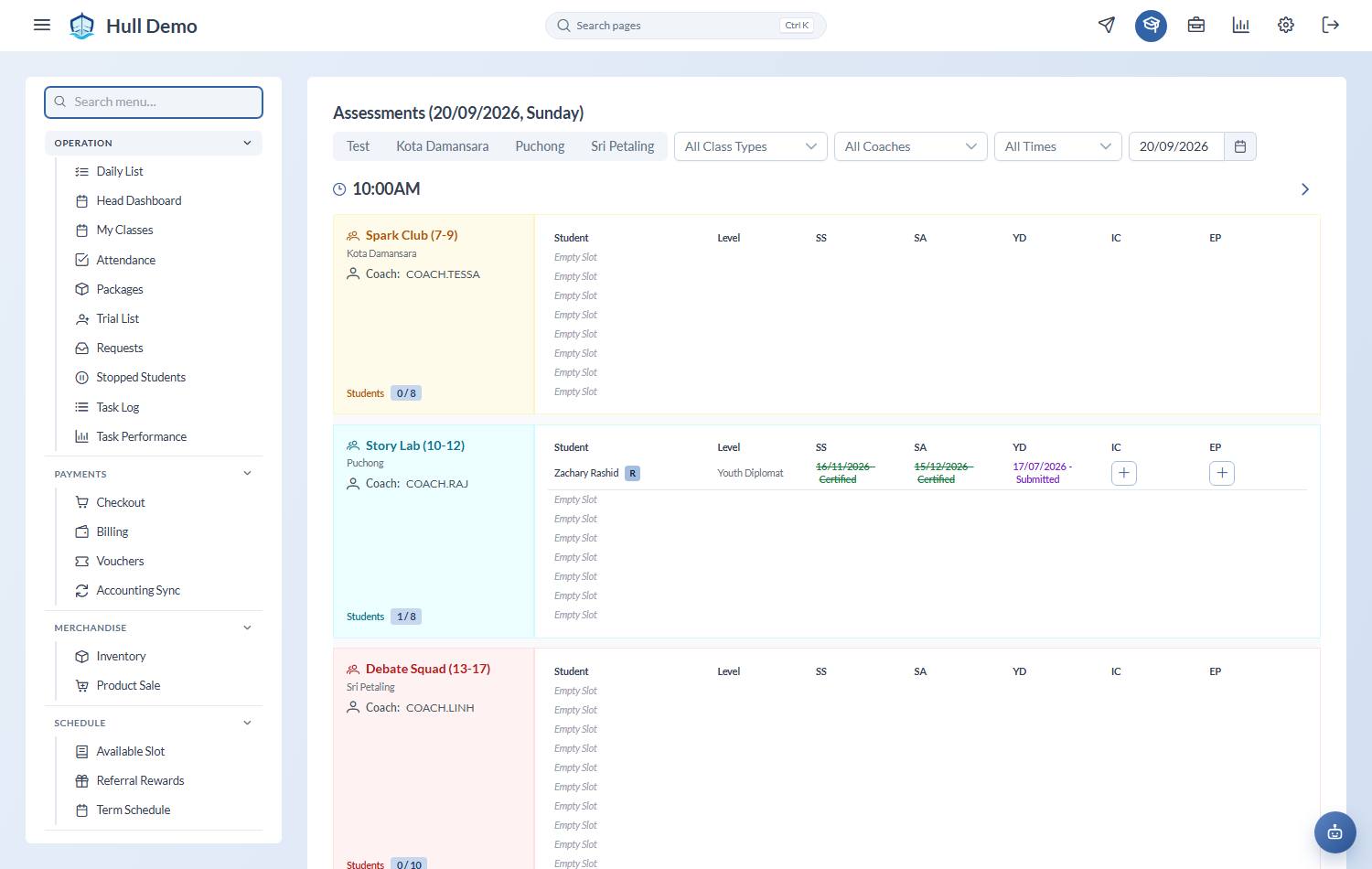
2. Add the assessment
Find the child in their class and add an assessment for the level they are being tested on. It is then scheduled, and appears for review once it has been carried out.
You pick the day. The date is chosen from the child's own class days — the sessions they were marked present at, plus today's and upcoming bookings — never a free calendar, so every assessment sits on a class the child was actually in. It defaults to today. A scheduled assessment can be moved later, from the class dialog or from the Assessments screen, and it re-attaches to that day's session by itself.
The class and the coach are recorded with it, so whoever reviews it later sees not just the student and level but where it happened and who was on deck.
3. What happens after
The assessment moves through a fixed sequence:
- Scheduled — booked, not yet done.
- Submitted — carried out, awaiting a result.
- Passed or Failed — decided at review.
- Printed, then Certified — the certificate is produced and handed over.
Passing qualifies the child for the next level.
See Review and pass an assessment and Issue a certificate.
Recording an assessment that already happened
If a child was assessed before you started using Hull — or on paper — Add Past Assessment on the Assessments screen records it so their history is complete. Use it for migrating history, not as a shortcut around the normal flow.
Related: Review and pass an assessment · Spot students who have stalled.